tech
Share
This handy feature could save you a lot of battery on your iPhone
Published 12:50 5 Oct 2016 BST
Updated 12:54 5 Oct 2016 BST
Share
Published 12:50 5 Oct 2016 BST
Updated 12:54 5 Oct 2016 BST
 It's a common problem with iPhone users as your phone can casually decide that your 60% charged battery has done enough work for today and casually decide to pack in for the day.
This is especially true with older iPhones...
It's a common problem with iPhone users as your phone can casually decide that your 60% charged battery has done enough work for today and casually decide to pack in for the day.
This is especially true with older iPhones...
 With the introduction of iOS 9 a while back, Apple introduced a new feature alongside Low Power Mode which aims to prolong your battery life known as "Facedown Detection."
It's fairly straightforward, although we're sure there's some wizards at work within the phone itself to make it simple, if you leave your phone face down, the screen will no longer light up for notifications, saving you battery throughout the day.
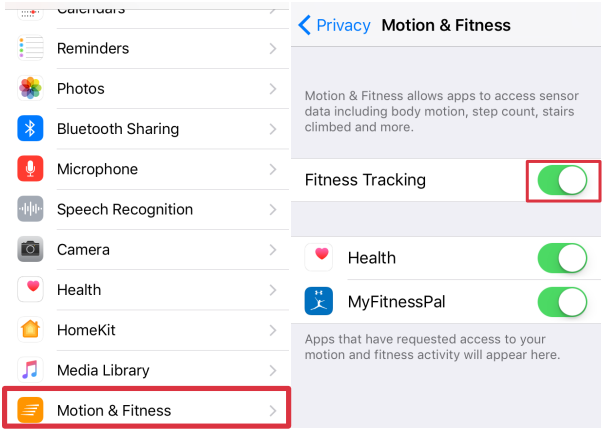
But you have to enable a couple of settings to ensure that this feature works on your phone. Do this by going into Settings>Privacy>Motion & Fitness.
Then ensure that Fitness Tracking is turned on...
With the introduction of iOS 9 a while back, Apple introduced a new feature alongside Low Power Mode which aims to prolong your battery life known as "Facedown Detection."
It's fairly straightforward, although we're sure there's some wizards at work within the phone itself to make it simple, if you leave your phone face down, the screen will no longer light up for notifications, saving you battery throughout the day.
But you have to enable a couple of settings to ensure that this feature works on your phone. Do this by going into Settings>Privacy>Motion & Fitness.
Then ensure that Fitness Tracking is turned on...
 Unfortunately, like many of the newer iOS updates, it doesn't work on some of the older models of iPhone such as the iPhone 5, iPhone 5c, iPhone 4s, and other older iPhones.


